

Introducing DocJuris in Word
DocJuris now works inside Microsoft Word: ask about the open document, review it against your Library, and run Custom Actions built for your team's own workflows.
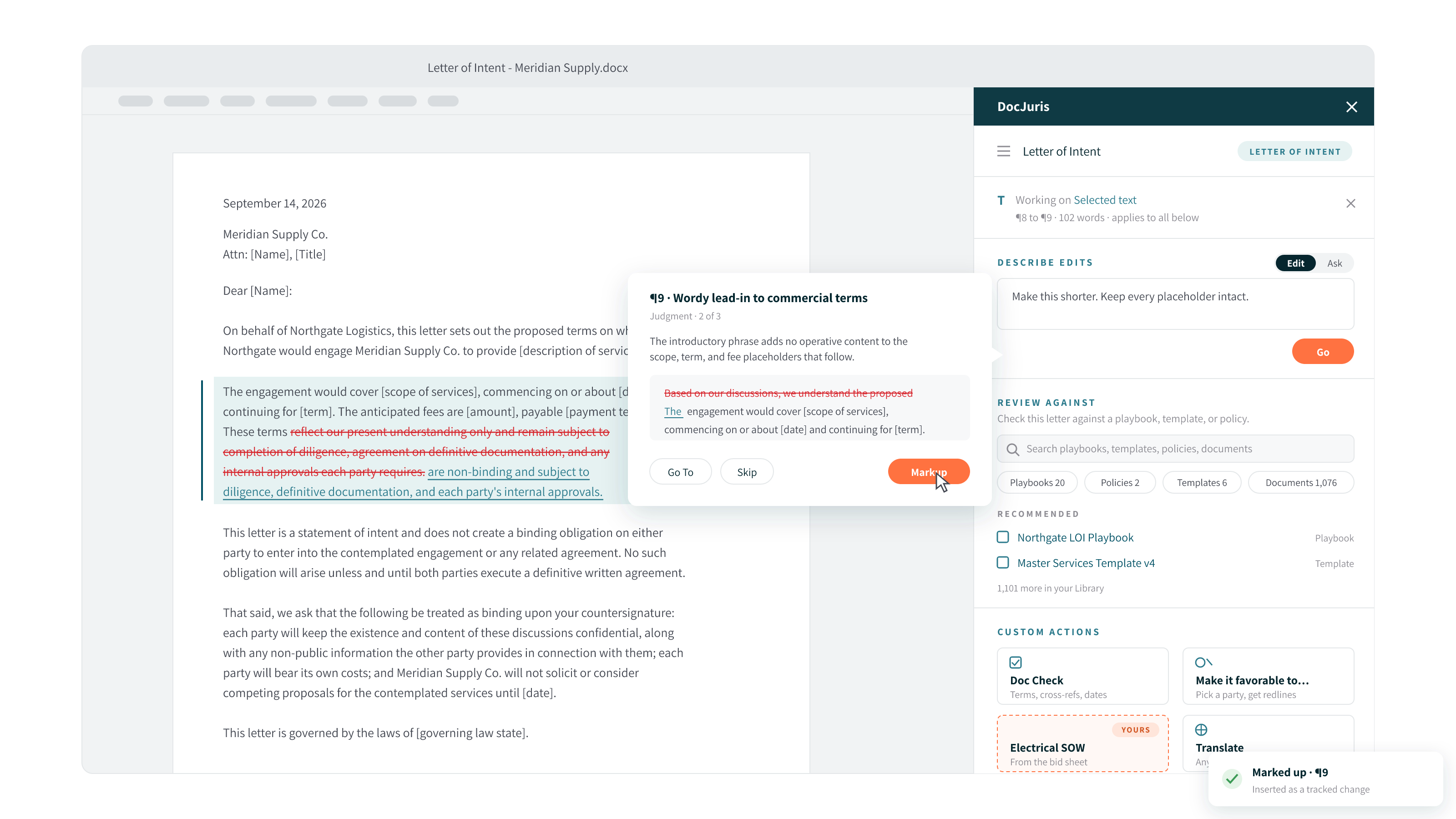
The agreement is open. The business is waiting. Your next step should be legal judgment, not moving a document between tools.
Introducing DocJuris in Word: AI contract review, drafting, and custom legal workflows inside Microsoft Word. Ask questions about the document in front of you, apply your team's playbooks and templates, and review proposed edits as native tracked changes.
But the real shift is not another place to ask AI a question. It is having a workflow built for your team, ready to run in the document you are already working on. Your procurement policy. Your site-specific statement of work. Your preferred negotiating positions.
Less moving files. Less rebuilding instructions. More time for the decisions only your team can make.
AI contract review in Word, without the round trip
When we introduced our AI platform for in-house legal work, the goal was to put AI to work on the tasks legal teams actually need to complete. DocJuris in Word brings that approach to the document open in front of you.
Instead of leaving Word to upload a file, run a review, download the result, and reconcile versions, you can work from a connected side pane. The same DocJuris Library, permissions, sign-in, and audit trail come with you.
The browser still handles the broader workload. Word now gives you a place to act on the individual document, with your team's standards close at hand.
Custom Actions: your team's work, built into Word
Summarizing a clause is useful. Completing the particular statement of work your business needs, using the right quote, the right template, and the right internal rules, is a different kind of value.
Custom Actions are one-click workflows built by DocJuris legal engineers for your organization's specific work. They appear as tiles in your Word pane, alongside the standard actions. Your team describes the process. We build and test the action with you, using your real documents.
From a supplier quote to a statement of work ready for review
One industrial customer's legal team repeatedly prepares electrical statements of work from supplier quotes. Each needs a site-specific template and a fixed set of fields checked before it can move forward.
That team now has a Custom Action called Fill Electrical SOW. Select the action, provide the quote, and review the populated fields as tracked changes, with items needing human attention flagged.
The attorney is reviewing the work, not rebuilding it. And the action is built for that team's process, rather than asking the team to adapt to a generic workflow.
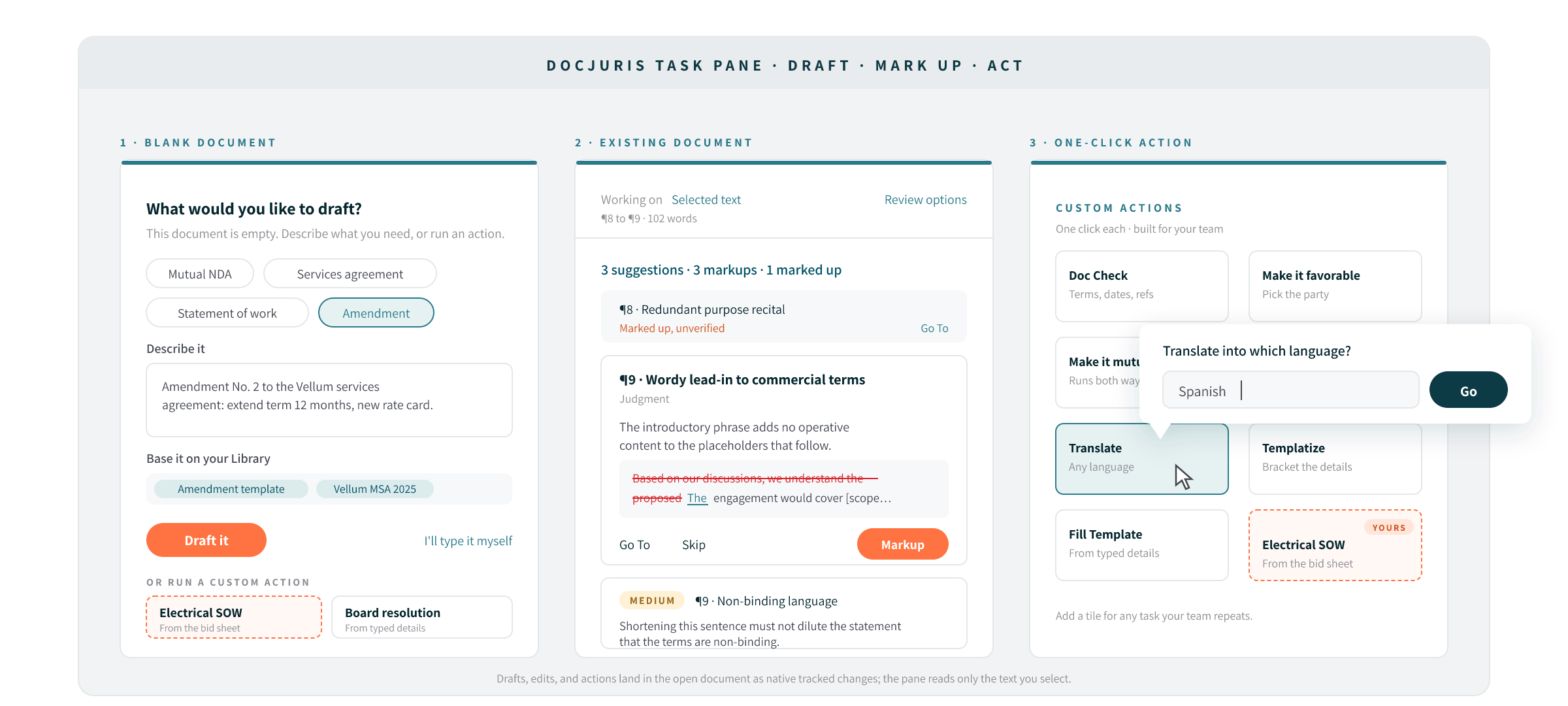
The same approach can support a vendor-onboarding check against your procurement policy, a data-protection addendum based on the appropriate regional template, or a conversion of counterparty paper into your agreement structure. Each action is scoped and built with your team.
You do not need an existing document to begin. A Custom Action can start from a blank page, using a template and supporting details to draft a statement of work, board resolution, or engagement letter.
When your process changes, the action changes with it. Your Word pane becomes a working collection of the tasks your department needs to get done.
Tell us the workflow you'd want as a tile.
Ask a question. Make a change. Keep moving.
For the work that does not need a custom workflow, the pane gives you two straightforward modes: Ask and Edit.
Use Ask to understand the document: What changed in this negotiation round? Does this statement of work conflict with the master agreement? Where is the governing law provision?
Use Edit to request a change: tighten the indemnity, set the liability cap to twelve months' fees, or fill in the delivery schedule from an attached quote. Select a passage in Word to focus the instruction on that text.
This extends AI document review beyond contracts. Work on policies, pleadings, statements of work, letters, and memos, with document-specific protections for elements such as captions, citations, defined roles, numbering, and fixed boilerplate. You can also begin on a blank page and draft in your team's house style.
Put your playbooks, policies, and precedents to work
A useful redline should reflect how your organization negotiates, not just what sounds reasonable in isolation.
DocJuris in Word connects the open document to your Library: playbooks with preferred positions and fallbacks, checklists, internal policies, templates, negotiation guidance, and past agreements. Find the relevant source and review against it without leaving Word.
The source determines the approach. Playbooks, checklists, and policies guide the review. Templates and past agreements provide a reference for term-by-term comparison, with proposed language adapted to the current document's defined terms.
Specific requirements stay specific. A reference position of "twelve (12) months' fees" remains a concrete cap, rather than becoming a vague request for a reasonable limitation.
No formal playbook yet? Start with the guidance you already have. You can also review without selecting a source: DocJuris asks which side you represent and reviews from that position. As your standards develop, our guide to building a contract playbook can help you organize them.
Clean redlines. Human control.
Getting a suggestion is only useful if you can see exactly what it changes.
DocJuris previews proposed edits before you apply them. Nothing is written into the document until you click. Applied edits become native Word tracked changes that you can review, accept, or reject.
The redlining is precise. Changing "sole discretion" to "reasonable discretion" shows that word-level substitution, not mark an entire paragraph as replaced. That makes the substance of the negotiation easier to see.
It is the same focus behind DocJuris contract redlining software: move the work forward while keeping the reviewer in control. AI handles the mechanics. Your team makes the judgment.
One platform. The right workspace for the job.
DocJuris in Word complements the web platform rather than replacing it. Use the browser for bulk document review, incoming contract screening, intake, and playbook management. Use Word for the document you are actively drafting, reviewing, or negotiating.
The pane respects your existing Library permissions and uses the same sign-in and audit trail. Single sign-on and multifactor authentication carry over, and IT can deploy the add-in through the Microsoft 365 admin center, with access enabled by an administrator.
For teams already using DocJuris, this is another way to put the same platform to work. For teams evaluating it for the first time, it is a starting point grounded in a document and a workflow you already know.
Frequently asked questions about DocJuris in Word
Which versions of Microsoft Word are supported?
DocJuris in Word supports Word for Microsoft 365 on Windows and Mac, as well as Word on the web.
How is my document text processed?
Only the paragraph text is sent, to your organization's own DocJuris instance. The Word file itself is never uploaded, and nothing is written back until you apply a change.
Do I need a playbook to get started?
No. You can review against a policy, checklist, template, or past agreement in your Library. With no source selected, DocJuris asks which side you represent and reviews from that position.
Does the AI automatically change my document?
No. Proposed edits are previewed before you apply them. Changes you choose to apply appear as native Word tracked changes for your review.
How do we get a Custom Action built for our team?
Describe the workflow, the documents involved, and the rules it needs to follow. DocJuris legal engineers scope, build, and test the action with your team, then deploy it to your organization's Word pane.
Bring us the workflow you want off your plate
The statement of work your team rebuilds every week. The vendor check that means opening three reference documents. The first-pass redline that needs the same positions applied, every time.
Start there. We will work with you to identify where DocJuris in Word fits and what a Custom Action could take off your team's plate.
Your standards. Your workflow. Ready to run in Word.
Book a DocJuris in Word demo. Bring a real workflow. Let's talk about what it would take to complete it.
Want a one-click workflow built for your legal team, running inside Word? See how DocJuris contract redlining software extends into Word, then book a demo and bring a real workflow.
Related Articles


Redline meaning: what it is and why it matters in contract review
When teams negotiate contracts, small edits can have big consequences. A subtle change to payment terms or liability language can delay a deal or introduce unnecessary risk if it's not clearly tracked.
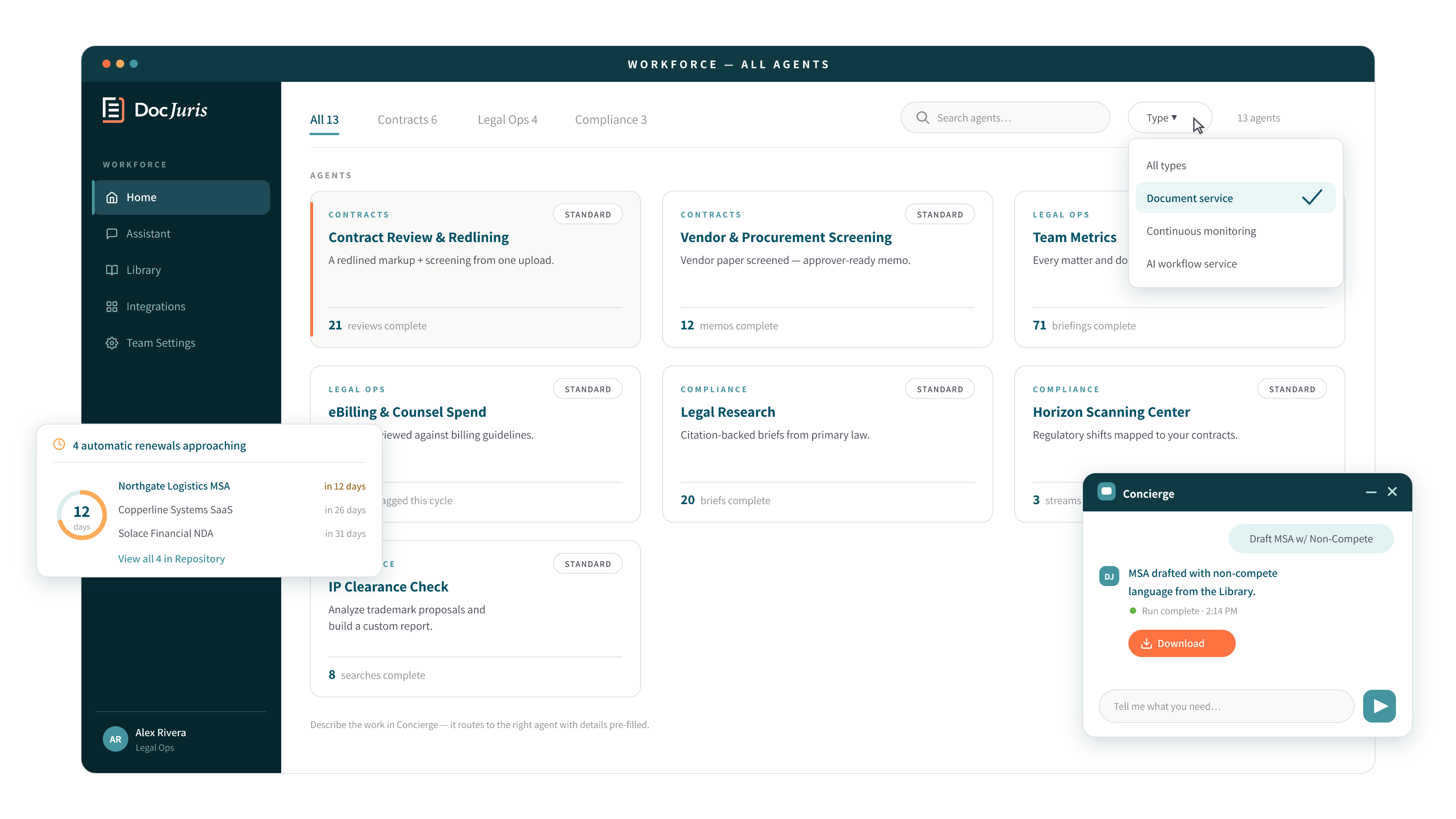
See the most complete AI service for in-house legal

Flex to anything
Move faster
Finish the job
Privacy-first legal AI: your data stays yours, never trains AI models, and is SOC 2 Type II certified.
DocJuris is not a law firm or a substitute for an attorney or law firm. We cannot provide any kind of advice, explanation, opinion, or recommendation about possible legal rights, remedies, defenses, options, selection of forms or strategies.

