New: DocJuris now works inside Microsoft Word. Review, draft, and run Custom Actions built for your team, right in the document. Read the announcement →

Contracts & Commercial
Legal document automation from template fill to complex population, with a review gate, and nothing silently invented.
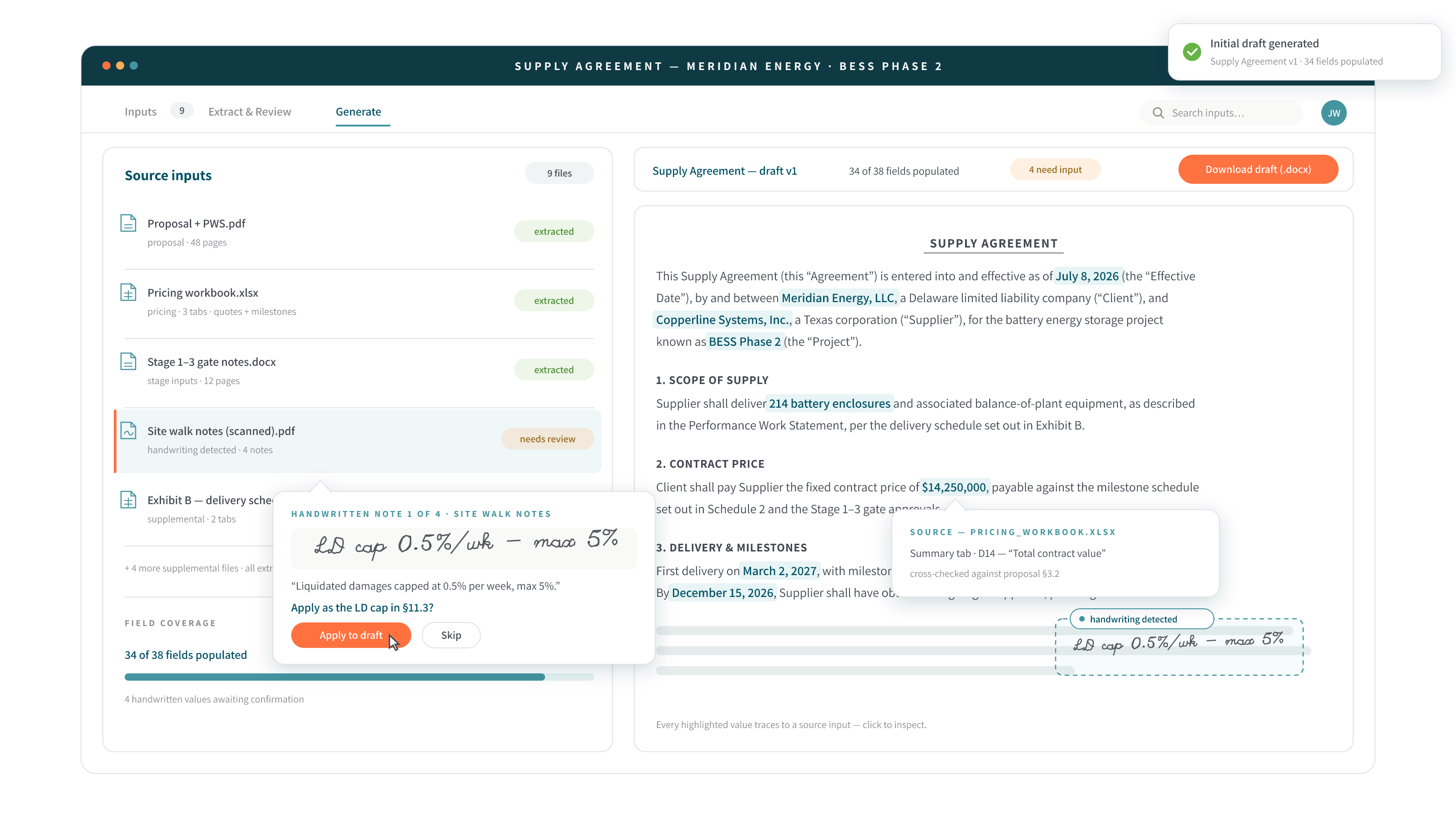
Templates, detected
Upload a Word template once and the fillable fields are detected automatically: effective dates, party names, entity types, jurisdictions. Anyone drafts through a simple guided form, or by just asking.
Deal file in
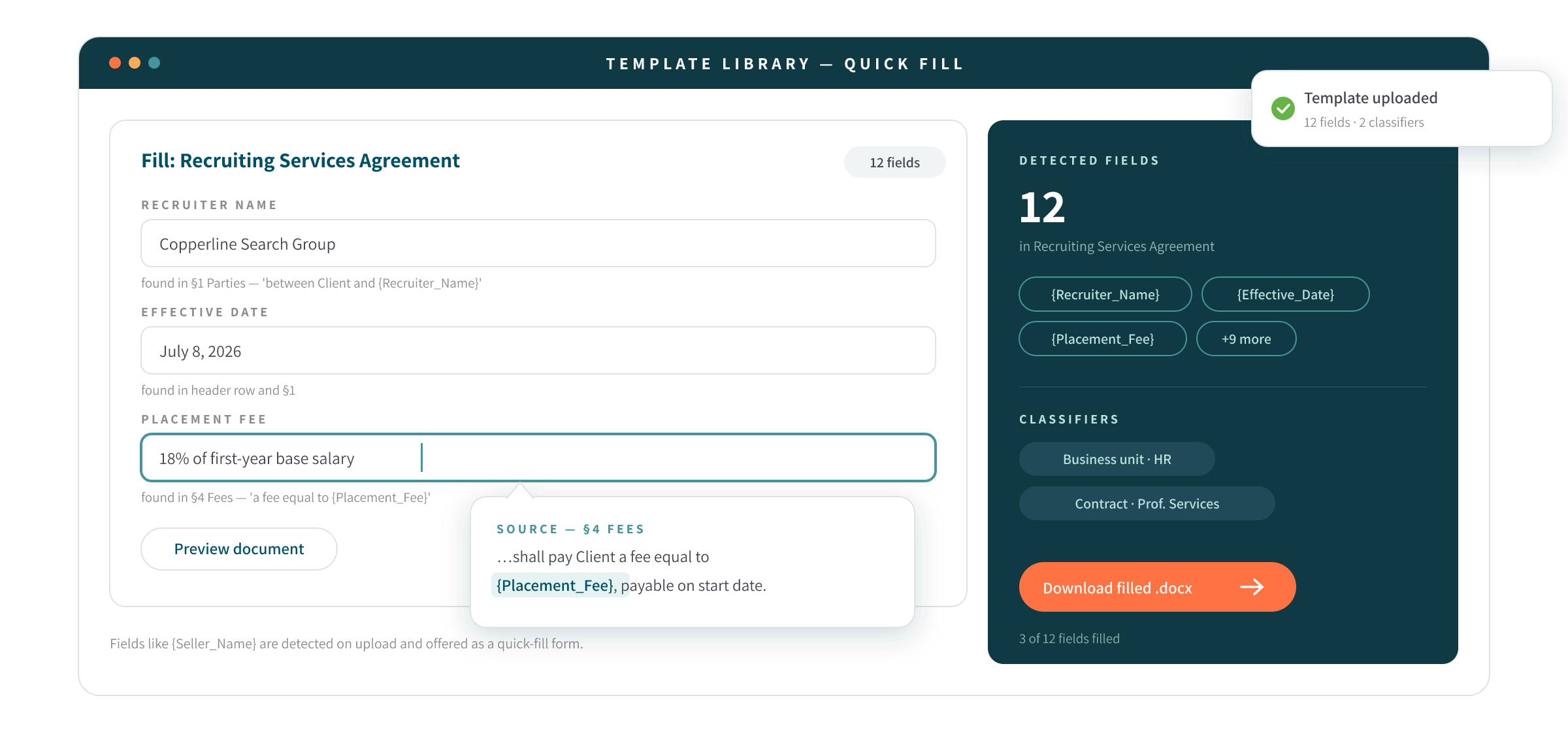
Point it at proposals, pricing sheets, exhibits, even a signed, handwritten letter of intent where margin changes override the typed text, and the deal terms are extracted and populated onto your own form, numbering and cross-references intact.
Nothing invented
Ambiguities come back as clarifying questions before a word is drafted, and every unfilled slot is visibly bracketed and listed in a gap report: an auditable line between what was sourced and what still needs a human.
How it works
Two versions of the same tax: “which version of the template?” plus an hour of find-and-replace on routine documents, and days of re-keying deal terms when a complex agreement needs standing up. Both disappear. Deal terms transfer without transcription errors, and attorney hours go to judgment calls on the draft, not assembly of it.
STEP 01
Load your template once; fields are auto-detected on upload. Per draft, provide the values, or drop in the deal documents themselves.
STEP 02
The template’s slots are cataloged, matching terms extracted from the deal file, and ambiguities raised as questions at a review gate. Drafting waits for your confirmation; revise and regenerate as often as needed.
STEP 03
A populated .docx on your form, numbering, schedules, and cross-references intact, plus a gap report of every field still open.
Handles your formats
Word templates, DOCX drafts, PDF deal files, handwritten LOIs, gap reports
See it in action
“Which entity signs, parent or subsidiary?” The review gate asks its questions before anything drafts. Nothing is silently invented.
FAQ
Mail merge and traditional document assembly software fill named fields from a spreadsheet. Document Generation reads unstructured deal documents (proposals, pricing schedules, a signed LOI), extracts the terms, asks clarifying questions, and populates your form with numbering and cross-references intact.
Yes, one with a review gate. Extracted terms are shown for your confirmation before drafting, ambiguities become questions, and every draft lands on your own template rather than a generic form.
Three things: it drafts on your paper, it never invents a term, and it discloses what it couldn't fill. DocJuris brackets every open slot and lists it in a gap report: an auditable line between what was sourced and what still needs a human.
Yes: typed or handwritten, and where handwritten margin changes override the typed text, the override wins, exactly as the parties intended.
The review gate. Extracted terms are shown for your confirmation before drafting, ambiguities become questions, and anything unfilled stays visibly bracketed and listed in the gap report, disclosed rather than papered over.
Book a demo and bring a template plus a deal file; we’ll populate a draft live in the session.
DocJuris empowers legal, procurement, and deal desk teams to close faster and reduce risk.
Request a demoThe DocJuris Workforce
Open an app, do the work, ship the file. Start with the most used, or browse your practice area; every app already speaks your playbook.
A finished first pass on any third-party paper: real redlines and a screening report in minutes.
From a quick risk read to the completed deviation memo, on your own template.
Deal documents in, a populated draft on your form out; nothing is silently invented.
Original + amendments in; a clean restated contract with tracked changes out.
On-template summaries, exception tables, and the full story of the negotiation.
Accept the work and list the exceptions without marking up the customer's paper.
The pre-signature proofread: cross-references, defined terms, numbering, all of it.
A secure deal room your counterparty can use with one click; no account is required.
Contracts searchable by meaning; every obligation mined, tracked, and alarmed.
Every invoice reviewed against your billing guidelines, with verdicts computed rather than guessed.
Intake forms, live matter boards, and audited approvals: the ops layer that runs itself.
The email thread becomes the matter record: structured, searchable, queryable.
Clauses, playbooks, policies, and answers, governed once and grounding everything.
The department, quantified: a live command center, a daily brief, work priced at market.
Citation-backed briefs from primary law across 8 jurisdictions, in minutes.
USPTO + usage + domains, with a DuPont risk rating in hours.
SIG, CAIQ, and custom grids answered from your policies; nothing is invented.
Regulatory change, mapped to your contracts, clauses, and dollars before it lands.
Construction paper marked up on the PDF, playbook-screened and precedent-aware.
A lease and its amendments in; a complete Excel abstract out.
Contract insurance requirements checked against the coverage you carry.
Every invoice read against the governing contract; the money you're owed, surfaced.
Describe the workflow; DocJuris builds a working capability in days.

Flex to anything
Move faster
Finish the job
Privacy-first legal AI: your data stays yours, never trains AI models, and is SOC 2 Type II certified.
DocJuris is not a law firm or a substitute for an attorney or law firm. We cannot provide any kind of advice, explanation, opinion, or recommendation about possible legal rights, remedies, defenses, options, selection of forms or strategies.


Launch special: book a demo, get a custom proposal, and save 20% on your first scope of work when you engage within 30 days.
Book my demo