New: DocJuris now works inside Microsoft Word. Review, draft, and run Custom Actions built for your team, right in the document. Read the announcement →

Legal Operations
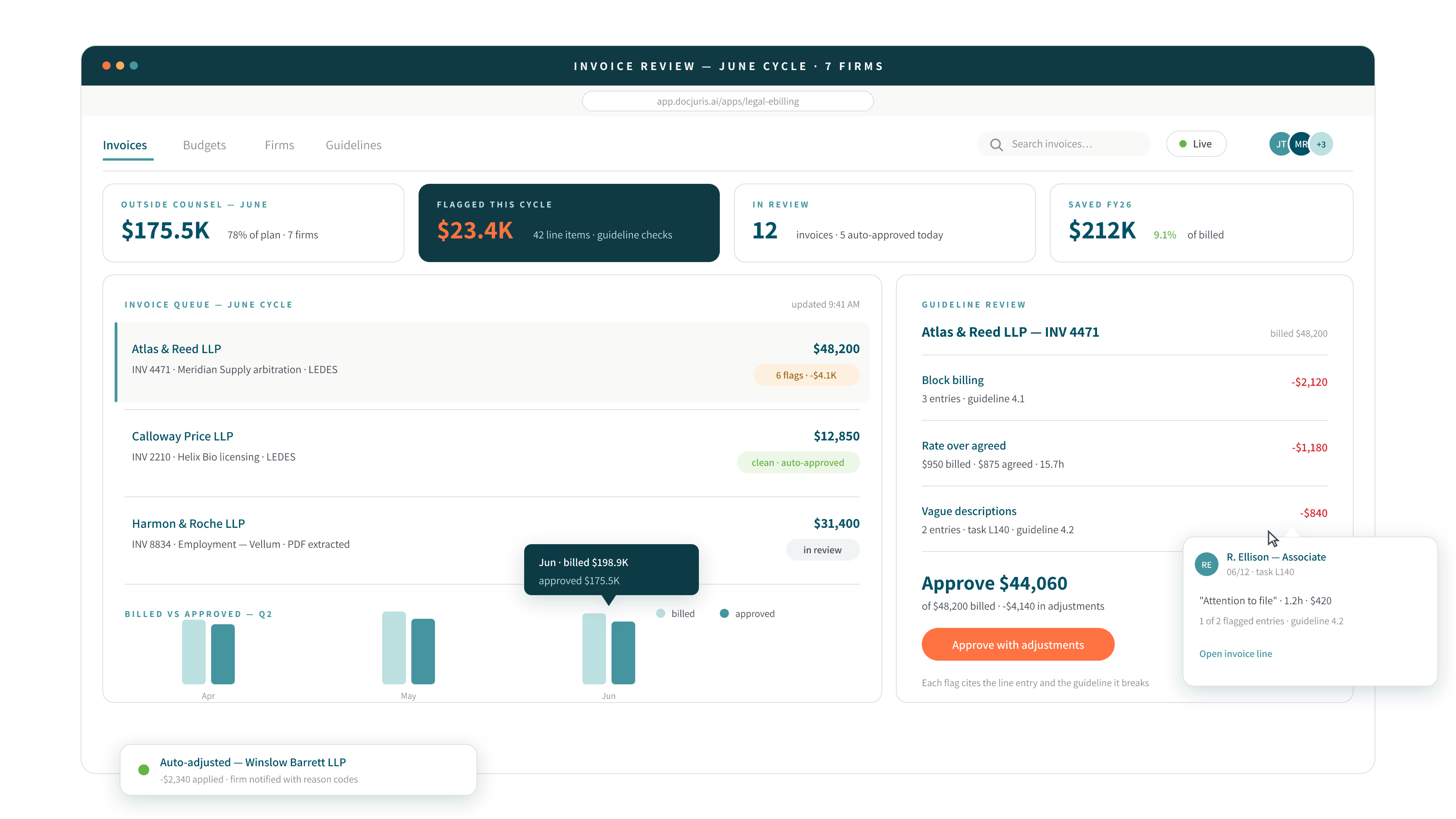
A rules engine checks each line of every legal bill against your billing guidelines; the verdict is computed by the rules, then explained in plain English.
No-onboarding portal
Firms submit LEDES or PDF invoices through a secure, email-verified portal, with no accounts and no onboarding, and every invoice is parsed line by line on arrival.
Rules, not vibes
Rate caps, timekeeper rate cards, block billing, budget posture: the approve / adjust / reject recommendation is computed by your rules, explained in plain English, and routed for approval.
Legal spend management
Per-firm scorecards, phased and task-code budgets, accruals, multi-currency and tax, alternative fee arrangements, UTBMS and GL pre-coding, and AP-ready exports, with scheduled reports and weekly digests.
How it works
Outside-counsel invoices get skimmed and paid; the guidelines they violate are enforced only when someone has time. Workforce runs the full e-billing loop, outside counsel management on the record: legal knows its spend by firm, matter, and month; firms know they’re being measured; and detected savings are receipted line by line.
STEP 01
Set your billing rules and rate cards, then give firms the secure upload link; they’re submitting invoices the same day.
STEP 02
Every invoice is parsed line by line, rules applied deterministically, recommendation cards drafted in plain English, and approvals routed.
STEP 03
Decided invoices with line-item receipts, firm scorecards, spend trends, scheduled reports, and AP-ready exports, plus an AI Executive Briefing one click from a board PDF.
Handles your formats
LEDES, PDF invoices, UTBMS & GL coding, AP exports, board-ready PDF briefings
See it in action
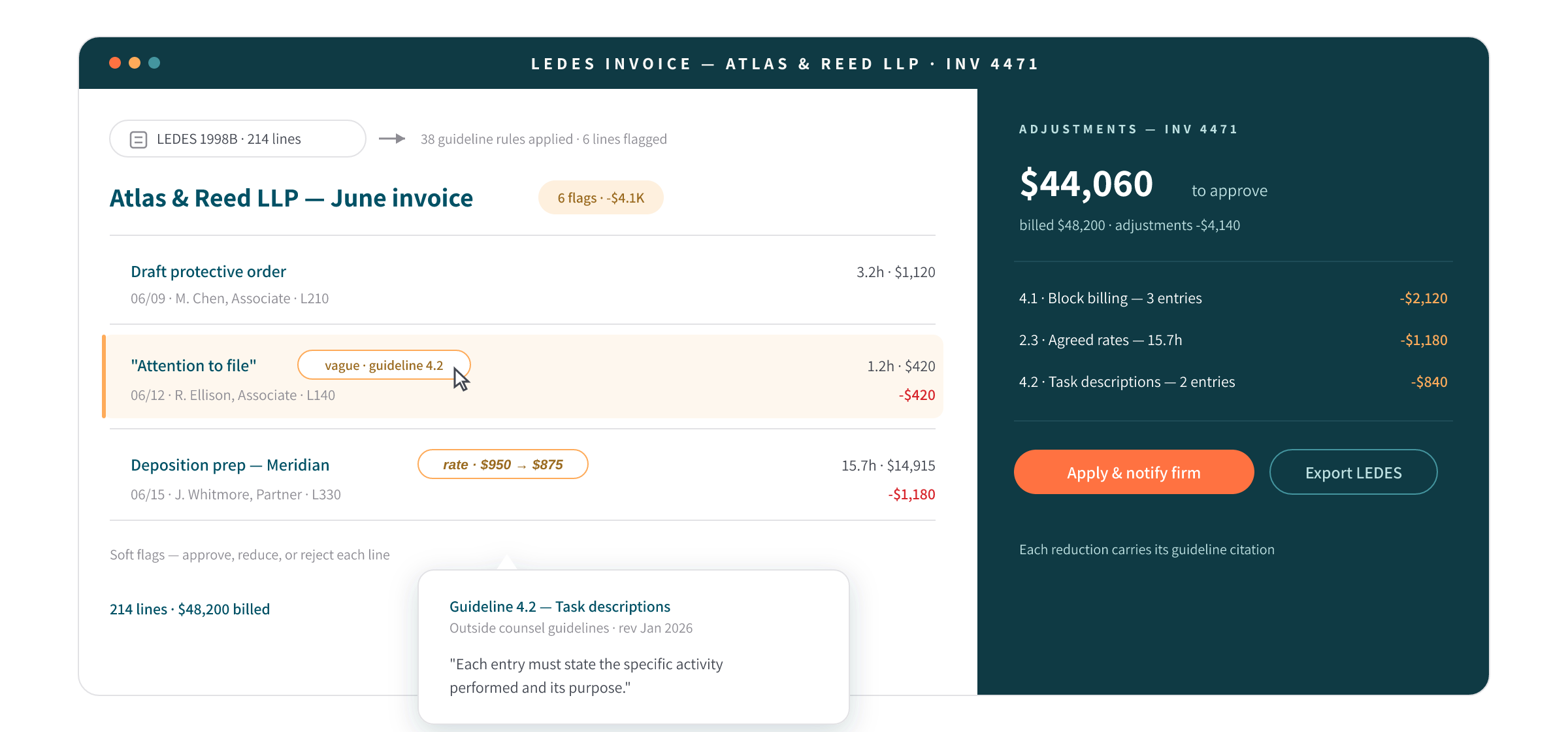
Block-billed 7.5 hrs: flagged. Associate at $610 against a $550 card: flagged. Recommendation: adjust, $1,485 for reduction.
FAQ
No. Firms get a secure, email-verified upload link, with no account and no onboarding, and submit LEDES or PDF invoices directly. Parsing happens on arrival.
Rate caps and timekeeper rate cards, block-billing detection, budget posture (phased, task-code, fiscal), accrual handling, multi-currency and tax, and alternative fee arrangements, with UTBMS and GL pre-coding for AP.
Block billing lumps several tasks into a single time entry so no line can be evaluated on its own. DocJuris detects block-billed entries automatically, flags them against your guidelines, and includes them in the computed adjust/reject recommendation.
Yes: the approve / adjust / reject recommendation is computed by your rules engine, not vibes. The AI’s job is explaining the verdict in plain English and drafting the recommendation card for approval routing.
Software that receives outside-counsel invoices electronically (LEDES or PDF), enforces your billing guidelines line by line, and routes the results to approval and AP. DocJuris adds firm scorecards, budgets, accruals, and an AI briefing on top.
Per-firm scorecards, phased and task-code budgets, accruals, multi-currency, and cross-firm benchmarks, with scheduled reports, weekly digests, and an AI Executive Briefing one click from a board PDF.
Book a demo, bring a redacted invoice and your guidelines, and we’ll run the line-by-line review live.
DocJuris empowers legal, procurement, and deal desk teams to close faster and reduce risk.
Request a demoThe DocJuris Workforce
Open an app, do the work, ship the file. Start with the most used, or browse your practice area; every app already speaks your playbook.
A finished first pass on any third-party paper: real redlines and a screening report in minutes.
From a quick risk read to the completed deviation memo, on your own template.
Deal documents in, a populated draft on your form out; nothing is silently invented.
Original + amendments in; a clean restated contract with tracked changes out.
On-template summaries, exception tables, and the full story of the negotiation.
Accept the work and list the exceptions without marking up the customer's paper.
The pre-signature proofread: cross-references, defined terms, numbering, all of it.
A secure deal room your counterparty can use with one click; no account is required.
Contracts searchable by meaning; every obligation mined, tracked, and alarmed.
Every invoice reviewed against your billing guidelines, with verdicts computed rather than guessed.
Intake forms, live matter boards, and audited approvals: the ops layer that runs itself.
The email thread becomes the matter record: structured, searchable, queryable.
Clauses, playbooks, policies, and answers, governed once and grounding everything.
The department, quantified: a live command center, a daily brief, work priced at market.
Citation-backed briefs from primary law across 8 jurisdictions, in minutes.
USPTO + usage + domains, with a DuPont risk rating in hours.
SIG, CAIQ, and custom grids answered from your policies; nothing is invented.
Regulatory change, mapped to your contracts, clauses, and dollars before it lands.
Construction paper marked up on the PDF, playbook-screened and precedent-aware.
A lease and its amendments in; a complete Excel abstract out.
Contract insurance requirements checked against the coverage you carry.
Every invoice read against the governing contract; the money you're owed, surfaced.
Describe the workflow; DocJuris builds a working capability in days.

Flex to anything
Move faster
Finish the job
Privacy-first legal AI: your data stays yours, never trains AI models, and is SOC 2 Type II certified.
DocJuris is not a law firm or a substitute for an attorney or law firm. We cannot provide any kind of advice, explanation, opinion, or recommendation about possible legal rights, remedies, defenses, options, selection of forms or strategies.


Launch special: book a demo, get a custom proposal, and save 20% on your first scope of work when you engage within 30 days.
Book my demo